
Starting Point
If you manage WordPress the traditional way, every website is treated as a completely independent installation.
Each site contains its own copy of WordPress Core, its own plugins, its own themes, and its own uploads. Whether you’re hosting two websites or two hundred thousand, the deployment model is essentially the same: copy the application into another directory and maintain it separately.
At first, this doesn’t seem like a problem.
Storage is relatively inexpensive, and a single WordPress installation only consumes a few hundred megabytes. But as your portfolio grows, those duplicate files multiply rapidly. The same version of WordPress Core is stored repeatedly. The same plugins are copied into every website. The same themes are duplicated over and over again.
The result isn’t just wasted storage.
It’s operational overhead.
Every WordPress update has to be repeated across every installation. Every plugin update requires another deployment. Every backup contains thousands of identical files. Security audits, integrity verification, and vulnerability management all spend time processing the same application code again and again.
That approach works well when you’re managing a handful of websites.
It doesn’t scale when you’re responsible for dozens, hundreds, or even thousands of sites.
I wanted to stop treating every website as an independent WordPress installation and start treating WordPress as a managed software platform.
The Problem
Every WordPress installation contains four primary components:
- WordPress Core
- Plugins
- Themes
- Uploads
Only one of those is inherently unique to a website: its uploads.
Everything else is application software.
If twenty websites are running the same version of WordPress with the same plugins and themes, why should the server store twenty identical copies?
Beyond storage, duplication creates additional problems.
Every security update must be deployed repeatedly.
Every integrity scan analyzes the same files.
Every vulnerability assessment has to determine which websites are affected.
As the number of websites grows, operational complexity grows with it.
Rethinking the Architecture
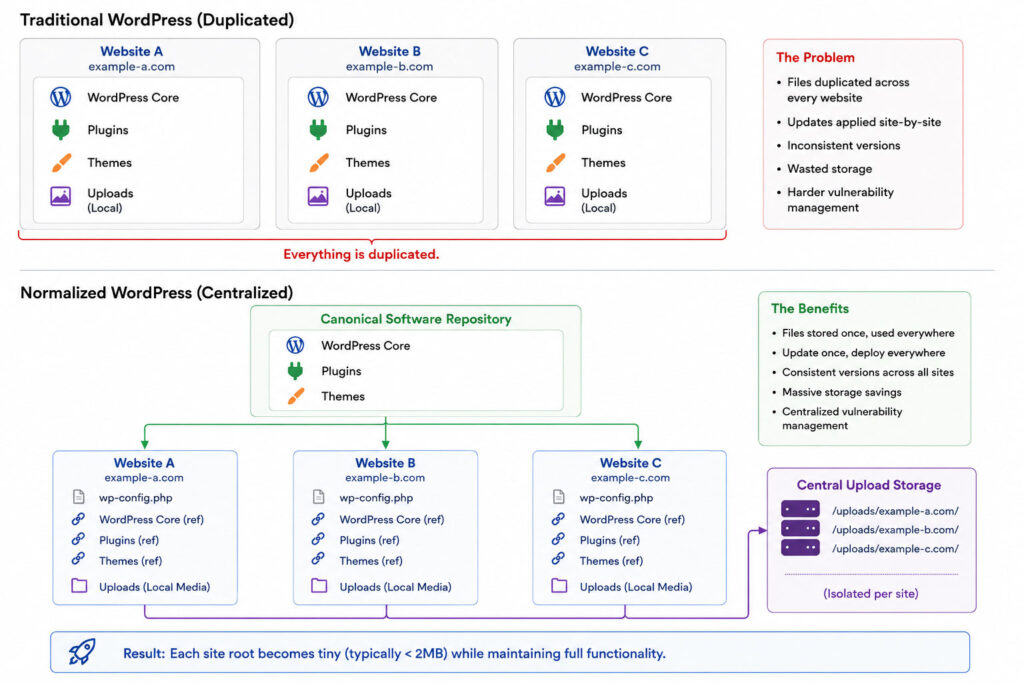
Instead of treating every website as an isolated installation, I separated application software from website-specific data.
That became the foundation of my normalization strategy.
The goal wasn’t simply to reduce storage.
The goal was to create a platform where software is managed once and consumed everywhere.
Normalization shifts WordPress from an installation-centric architecture to a software-centric architecture.
Instead of every website owning its own copy of WordPress, websites consume centrally managed software components.
Symbolic links (symlinks) are simply the mechanism that makes this possible. They expose normalized software to each website while allowing WordPress to continue operating exactly as it always has.
From WordPress’s perspective, nothing changes. WordPress Core, plugins, themes, and uploads all appear in their expected locations. The filesystem behind those paths has simply been normalized.
WordPress Core
WordPress Core is versioned software.
There is no benefit to storing the same version hundreds of times.
Instead, a normalized environment maintains a single canonical copy of every supported WordPress version.
Throughout this article, “canonical” refers to the single approved copy of a software component that every website references.
Each website references that version using symbolic links.
Updating WordPress becomes publishing one new version instead of updating every website individually.
Plugins
The plugin directory still appears exactly where WordPress expects it. The difference is that every plugin is a symbolic link to a centrally managed, versioned canonical repository.
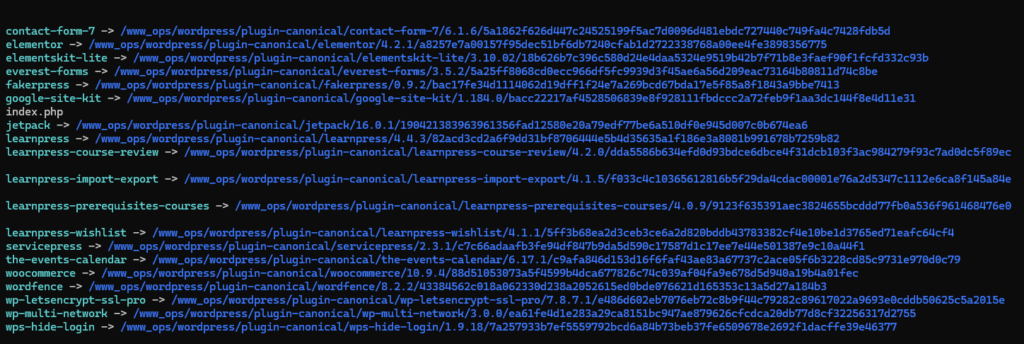
Plugins follow exactly the same model.
Instead of copying plugins into every site’s wp-content/plugins directory, plugins are maintained in a centralized repository.
Each version exists once.
Every website references the same canonical files.
Updating a plugin becomes publishing a single version rather than copying files across every website.
Themes
Themes are normalized exactly like plugins.
Rather than maintaining hundreds of duplicate copies, themes become centrally managed software components.
One update immediately becomes available everywhere it’s approved for use.
Uploads
Uploads require a different approach.
Unlike application code, media belongs to an individual website.
However, uploads don’t need to reside inside the WordPress installation.
Instead, every website’s uploads directory is normalized into a standardized storage hierarchy and linked back into WordPress using a symbolic link.
For example:
/www_data/{domain}/wp-content/uploads
    -> /www_ops/wordpress/site-uploads/{domain}
Every website still has its own isolated media library, but every upload now resides beneath a common storage root.
This creates a consistent storage architecture across the entire platform.
It also makes future infrastructure improvements significantly easier.
Storage can be expanded independently of the web server.
Media can move to dedicated storage, network storage, or object storage without restructuring WordPress.
A CDN or media-optimized infrastructure can be introduced without modifying every individual website.
Uploads remain isolated.
The storage architecture becomes standardized.
Security and Integrity
Normalization fundamentally changes how WordPress security is managed.
During the initial normalization process, every file is verified using a SHA-256 hash—a unique digital fingerprint—to ensure it is identical to the canonical version before duplicate copies are replaced with symbolic links.
Once software has been normalized, those hashes become the platform’s integrity baseline.
If a plugin, theme, or WordPress Core installation no longer matches its approved hash, the platform immediately detects the drift.
That makes unauthorized modifications, accidental file changes, corruption, and compromised software much easier to identify.
Normalization also transforms vulnerability management.
Without normalization, a newly disclosed vulnerability might require determining which of 30,000 websites are running the affected version of a plugin.
With normalization, the platform already knows exactly which websites reference every canonical software version.
Instead of asking:
Which websites are vulnerable?
The question becomes:
Which canonical software versions are affected?
Publishing a patched version and updating symbolic links becomes dramatically faster than individually updating thousands of installations.
Deployment and Version Management
Normalization fundamentally changes how WordPress software is deployed.
Normalize Existing Software
When software is introduced into the platform, the first step is determining whether an identical canonical version already exists.
If an approved canonical version already exists, the website simply references it. Otherwise, a new canonical version is created, verified, and published to the repository.
From that point forward, software deployments become version-based rather than file-based.
Versioned Canonical Repositories
Every supported version of WordPress Core, plugins, and themes is stored once inside a centralized repository.
For example:
wordpress/
    7.0.2/
    7.0.3/

plugins/
    woocommerce/
        10.2.1/
        10.2.2/

themes/
    astra/
        4.9.0/
Each website simply references the approved version.
Publishing a new release never overwrites an existing version. Instead, a new canonical version is added alongside previous releases.
Deploy New Versions
Deploying software no longer means copying files into every website.
A new canonical version is published once, and websites simply update their symbolic links to reference the approved release.
Whether you’re updating ten websites or ten thousand, deployment takes seconds because links change—not files.
Rollbacks
Versioned software makes rollbacks just as simple.
If a deployment needs to be reversed, websites can immediately repoint to the previous approved version without restoring backups or copying files.
Returning to a known-good release becomes a metadata change instead of a file operation.
Site-Specific Customizations
Not every website should share every component forever.
If a website requires a customized plugin or theme, the symbolic link can simply be removed.
A local copy is created, modifications are made, and only that website becomes independent.
Every other website continues using the canonical version.
Production and Development
Production and development environments maintain independent canonical repositories.
Production websites reference stable, certified software.
Development and staging environments can reference newer versions for testing.
Promoting software between environments becomes changing approved references instead of copying software across servers.
Provisioning New Websites
Provisioning also becomes dramatically faster.
Instead of copying hundreds of megabytes of application code, a new website consists primarily of:
- Creating the website structure
- Creating symbolic links
- Generating configuration
- Creating an isolated upload directory
A fully functional WordPress website can be provisioned in seconds because the application software already exists.
Enterprise Scale
The advantages become even more significant in enterprise environments.
Consider a university operating twenty independent WordPress multisite networks.
One network hosts every academic department.
Another hosts every course.
Another hosts faculty websites.
Others support research labs, student organizations, athletics, alumni, continuing education, and administrative departments.
A course network may create a website for every course offered each semester. Alumni networks continue growing with graduating classes and regional chapters. Research groups and student organizations expand year after year.
Collectively, those networks can easily grow into hundreds of thousands of WordPress websites.
Without normalization, every network stores duplicate copies of WordPress Core, plugins, and themes. Storage grows rapidly. Backups become larger. Deployments become slower. Vulnerability management becomes increasingly difficult.
With normalization, shared software exists only once per version.
Whether the platform manages twenty websites or two hundred thousand, software remains centralized while every website retains only what makes it unique—its configuration, database, and content.
The Benefits Go Beyond Storage
Before Normalization
855M  wordpress-site-01
513M  wordpress-site-02
460M  wordpress-site-03
448M  wordpress-site-04
132M  wordpress-site-05
130M  wordpress-site-06
125M  wordpress-site-07
After Normalization
4.0M  wordpress-site-02
1.7M  wordpress-site-01
1.7M  wordpress-site-03
1.6M  wordpress-site-04
1.6M  wordpress-site-05
1.5M  wordpress-site-06
1.5M  wordpress-site-07
Site 02 contains two web roots in both measurements.
The seven largest WordPress site roots previously ranged from 125MB to 855MB. After normalization, those same roots were reduced to approximately 1.5MB to 4MB. The reduction came from eliminating duplicated application software—not from removing functionality.
Reducing storage is the most visible outcome of normalization, but it isn’t the primary reason I built this architecture.
The real value is operational.
Instead of managing thousands of independent WordPress installations, you’re managing a centralized software platform.
That changes everything.
A normalized architecture allows you to:
- Update WordPress Core once.
- Update plugins once.
- Update themes once.
- Publish new software in seconds.
- Roll back software just as quickly.
- Provision new websites in seconds.
- Eliminate version drift across every website.
- Detect unauthorized code changes through SHA-256 hash verification.
- Identify vulnerable software versions instantly.
- Manage vulnerabilities by software version instead of individual websites.
- Simplify backups by eliminating duplicated application code.
- Standardize media storage for future CDN, network storage, or object storage.
- Keep every website running approved, verified software.
- Allow site-specific customizations only when they’re actually needed.
Storage savings are simply the most visible benefit.
The real achievement is transforming WordPress from thousands of independent installations into a centrally managed, enterprise-scale software platform.
That philosophy became one of the core design principles behind ServicePress. Rather than managing individual WordPress installations, ServicePress manages a normalized WordPress platform that is easier to deploy, easier to secure, easier to maintain, and built to scale.